
Imagine this: you’re designing a smart home device that tracks energy usage in real time. The sensors are ready, the cloud software is built, but the device keeps lagging and draining power too fast. The culprit? The wrong microcontroller for IoT.
This is one of the most common bottlenecks in IoT product development – it’s the thing that holds up all the others. Your microcontroller (MCU) is not just a piece of hardware; it’s the ‘brain’ that actually makes all the decisions – how to read data from your sensors, whether to talk to the cloud or not, and what to do with it all. Choosing the right one is what makes the difference between a device that’ll happily run on a coin cell for months and one that’s lucky to make it a week.
This guide is a step-by-step walkthrough that will help you figure out which MCU is the right one for your IoT product. We’ve thrown in some examples, some comparisons, and a few practical insights from the MicroLOGIX engineering team – because we’ve been in this spot before and know it’s a minefield.
Table of Contents
Step 1: Understand the Role of a Microcontroller in IoT
A microcontroller in IoT devices is responsible for sensing, processing, and connecting. It’s what enables your device to think and talk to other systems.
In simple terms:
Sensors collect data → Microcontroller processes it → Connectivity module transmits it to the cloud.

The microcontroller handles:
- Sensor data acquisition
- Local processing or control logic
- IoT connectivity (Wi-Fi, BLE, Zigbee, etc.)
- Power management and security
At MicroLOGIX, every IoT prototype we build starts by mapping these core MCU functions to product goals, balancing speed, power, and communication range.
Step 2: Define Your IoT Product Requirements
Before you compare chips, identify what your device actually needs.
Here’s a simplified checklist we use internally at MicroLOGIX:
| Requirement | What It Means | Example |
| Performance | Speed and efficiency for processing sensor data | Smart camera → Needs fast 32-bit MCU |
| Power | Battery life and low-power operation | Remote weather sensor → Must run for months |
| Memory | Firmware and data storage | IoT gateway → Requires >256KB Flash |
| Connectivity | Wireless standard support | Wearable → Needs BLE, not Wi-Fi |
| Environmental tolerance | Temperature, vibration resistance | Industrial IoT → Rugged MCU required |
| Cost and sourcing | Supply chain stability | Use MCUs with long lifecycle support |
Pro Tip: Always think long-term. Switching MCUs mid-development can delay production by months.
Step 3: Choose the Right Bit Architecture
8-bit MCUs
- For simple, low-cost tasks (lighting control, small sensors).
- Example: Microchip PIC16 or ATmega328 (used in Arduino Uno).
- Limited memory and no built-in IoT connectivity.
16-bit MCUs
- Mid-range performance for basic automation and metering.
- Balanced between cost and functionality.
32-bit Microcontrollers for IoT
- The industry standard for today’s IoT applications.
- Offer advanced capabilities like AI edge processing, secure boot, and multi-sensor interfaces.
- Common examples: ESP32, STM32, nRF52, TI CC3200.
At MicroLOGIX, over 80% of new IoT designs we prototype use 32-bit microcontrollers for IoT, mainly for their performance-to-cost ratio and scalability.
Why Most 32-bit IoT MCUs Use RISC (ARM) Architecture
Beyond bit width, microcontrollers also differ in instruction set architecture, primarily CISC vs RISC, which directly impacts power efficiency and execution predictability.
CISC (Complex Instruction Set Computing)
CISC architectures use complex instructions that can perform multiple operations in a single command. While this reduces instruction count, it increases decoding complexity and power consumption. These architectures are more common in legacy and desktop computing systems, where energy efficiency is less critical.
RISC (Reduced Instruction Set Computing)
RISC architectures rely on simpler instructions that execute efficiently and predictably, often in a single clock cycle. This results in:
- Lower power consumption
- More deterministic real-time behavior
- Better suitability for battery-powered and always-on devices
This is why nearly all modern IoT microcontrollers are built on ARM RISC architecture.
The same ARM design principles that enabled all-day battery life in smartphones are now driving adoption in AI servers, where performance-per-watt is critical. That same efficiency translates directly into IoT devices, enabling longer battery life, secure edge processing, and scalable product designs.
From MicroLOGIX’s engineering perspective, ARM-based 32-bit MCUs offer a proven foundation that scales from simple sensing nodes to edge-intelligent systems without forcing architectural redesigns later in the product lifecycle.
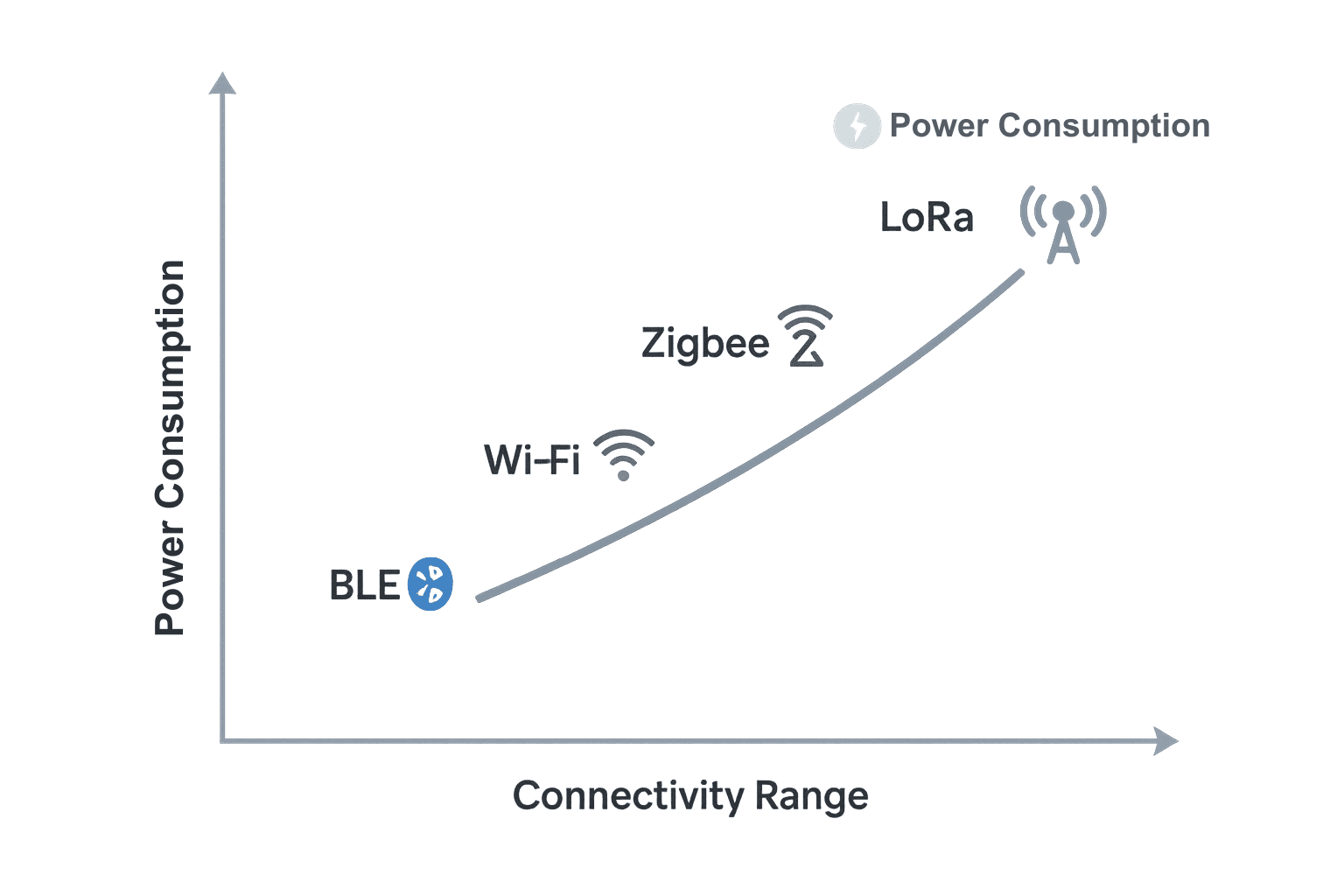
Step 4: Evaluate IoT Connectivity Options
Connectivity determines how your IoT device communicates. Choose an MCU that supports your preferred IoT connectivity protocol.
| Connectivity Type | Range | Typical Use | Recommended MCU |
| Wi-Fi | Medium | Smart home, consumer IoT | ESP32, TI CC3200 |
| BLE (Bluetooth Low Energy) | Short | Wearables, beacons | nRF52840, STM32WB |
| LoRa / LPWAN | Long | Agriculture, remote sensors | STM32WL, RAK3172 |
| Zigbee / Thread | Medium (mesh) | Lighting systems, automation | EFR32MG, nRF52833 |
| Cellular (4G/NB-IoT) | Very Long | Logistics, telematics | Quectel BG95, SIM7600 |
Step 5: Compare Popular IoT Microcontrollers
Here’s a concise IoT microcontroller comparison table highlighting strengths and ideal use cases:
| MCU | Architecture | Connectivity | Power Efficiency | Ideal Use Case |
| ESP32 | Dual-core 32-bit Xtensa | Wi-Fi, BLE | Moderate | Smart home, consumer IoT |
| STM32 | ARM Cortex-M | Wi-Fi, LoRa (with add-ons) | High | Industrial IoT, automation |
| nRF52840 | ARM Cortex-M4 | BLE, Zigbee, Thread | Very High | Wearables, low-power sensors |
| TI CC3200 | ARM Cortex-M4 | Wi-Fi | High | Secure, cloud-connected devices |
| EFR32MG | ARM Cortex-M33 | Zigbee, Thread | High | Mesh network lighting systems |
Step 6: Prioritize Power Efficiency
For battery-operated IoT devices, power efficiency is as critical as performance.
Key MCU features that impact battery life:
- Deep sleep modes for idle periods
- Low clock frequency when inactive
- Integrated power management unit (PMU)
- Efficient wireless communication
Example from MicroLOGIX:
We recently developed an industrial temperature sensor for a logistics client. By swapping out a high-power STM32F4 for a low-power STM32L0, we managed to eek another 12 months out of the battery – taking it from 6 months to over 18. And all without sacrificing any performance.
Step 7: Ensure Security and Scalability
IoT devices are prime targets for cyberattacks. Select MCUs that include hardware-level security features such as:
- Secure boot (prevents unauthorized firmware)
- Cryptographic accelerators (faster encryption/decryption)
- Hardware root of trust
- Memory protection units (MPUs)
Example:
TI CC3200 and STM32H7 both include embedded TLS/SSL stacks for secure cloud communication.
At MicroLOGIX, we integrate secure key storage and OTA (Over-the-Air) update systems to ensure IoT devices remain protected and easily upgradable.
Step 8: Prototype, Test, and Validate
Before finalizing your MCU, prototype using dev boards and simulation tools.
Checklist for testing:
- Evaluate performance under load.
- Test connectivity stability (range, latency).
- Measure current draw in all power modes.
- Verify firmware updates and recovery functions.
- Validate performance under temperature variations.
Case Study Insight:
A healthcare startup working with MicroLOGIX tested three MCUs — ESP32, STM32, and nRF52 for a wearable patient monitor.
After comparing power profiles, BLE performance, and SDK stability, they chose nRF52 and achieved 65% longer battery life with stable cloud sync.
Step 9: Plan for Firmware Maintenance and OTA Updates
Your IoT product should be ready for future improvements. Choose MCUs that support:
- OTA updates for remote firmware upgrades.
- Sufficient flash memory headroom (at least 20% spare).
- Reliable bootloaders to recover from failed updates.
Example:
MicroLOGIX’s in-house IoT platform uses ESP32 OTA API to roll out security patches to hundreds of deployed sensors without manual servicing.
Step 10: Partner with a Reliable EMS Provider
Selecting the right microcontroller is only part of the puzzle. Production success depends on how well it’s assembled, tested, and integrated.
At MicroLOGIX, we specialize in end-to-end IoT product manufacturing:
- PCB design and assembly (SMT, through-hole, mixed).
- Microcontroller programming and testing.
- IoT connectivity validation (BLE, Wi-Fi, LoRa, cellular).
- Compliance and certification (EMI/EMC, IPC, ISO).
Final Thoughts
The perfect microcontroller for IoT has got to strike the perfect balance between power, performance, connectivity, and scalability.
Start by defining your device’s real needs, comparing leading MCUs, and validating through prototyping. A well-chosen MCU not only improves reliability but also cuts time-to-market and long-term costs.
At MicroLOGIX, we’ve helped startups and OEMs across defense, healthcare, and industrial automation transform IoT ideas into commercial-ready products from concept to mass manufacturing.
FAQs
1. How does a microcontroller impact the overall cost of an IoT device?
The microcontroller can significantly affect the cost of an IoT device. More advanced MCUs with greater memory, speed, and connectivity support tend to be more expensive, but they enable better performance and scalability.
2. What are the best microcontrollers for IoT wearables?
For IoT wearables, nRF52840 (for BLE) and STM32 (for low power and performance) are excellent choices due to their power efficiency and connectivity options.
3. Can I use a microcontroller without an operating system for my IoT device?
Yes, many simple IoT devices use microcontrollers without an operating system. These devices rely on direct firmware control, which is more efficient for smaller, less complex applications.
4. How do I ensure my microcontroller choice supports future IoT standards?
Look for microcontrollers that offer firmware updates, have long lifecycle support, and provide flexibility for future protocols like 5G or NB-IoT.
5. What is the role of integrated peripherals in IoT microcontrollers?
Integrated peripherals like ADC, PWM, and UART allow the MCU to interface directly with sensors and actuators, simplifying design and reducing the need for additional external components.
6. What’s the difference between a microcontroller and a microprocessor for IoT?
A microcontroller integrates CPU, memory, and peripherals in one chip for small, efficient devices, while a microprocessor requires additional external components and is suited for more powerful systems like gateways or servers.
7. How does temperature affect the performance of an IoT microcontroller?
Extreme temperatures can affect the reliability and longevity of IoT devices. Look for industrial-grade MCUs that can withstand higher temperature ranges (e.g., STM32 series).
8. Are there any microcontrollers designed specifically for industrial IoT?
Yes, some microcontrollers, such as STM32, are specifically designed for industrial applications, offering ruggedness, enhanced connectivity, and support for real-time operating systems (RTOS).
9. What development tools should I use for programming my microcontroller?
Popular development environments include Arduino IDE, STM32CubeIDE, and ESP-IDF. Choose a tool compatible with the MCU you’re using and one that supports your required programming languages (e.g., C, Python).
10. How does a microcontroller’s clock speed affect its IoT performance?
A higher clock speed means faster processing, which is important for real-time data processing or complex computations. However, faster speeds can increase power consumption, so balance performance with power efficiency.